teamlab.artToday
teamLab Planets TOKYO, Toyosu
japanart
AI bookmark manager
Marqly saves, tags, and files every link with AI. Months later, ask it in plain words and it answers from your own saves, source attached, and tidies up if you let it.


Marqly in one loop: a new page is saved and auto-tagged as it lands; Ask then answers "what did I save about Japan?" from the user's own bookmarks, citing sources; tags for three untagged saves are proposed, applied after approval; the four Japan bookmarks show up filed together on one "Travel · Japan" board — and the board then opens in the app's card view.
The whole Marqly loop in one clip: save a page and AI tags it as it lands — then Ask answers from your library, cites the sources, tidies the untagged saves once you approve, files them on one board, and opens the board in cards.
AI assistant
Ask is the chat panel inside Marqly. It answers from what you saved, with a numbered source under every claim. It notices dead links and duplicates before you do. And when you say so, it tags, moves, and tidies, one approved change at a time.
Cold water is what makes it smooth1; blend it a minute longer than feels right2.

 2 sourcesWhat Ask remembers · 2 items
 ClaudeRead-only
 ChatGPTRead-only
 CursorCan edit
The library
Marqly turns the pile into a library. Boards, tags, and covers, kept in order without you doing the filing. Grid, list, or compact, sorted your way.

David Fravor: UFOs, Aliens, Fighter Jets, and Aerospace Engineering | Lex Fridman Podcast #122
The Nimitz encounter, firsthand: the pilot who chased the tic-tac, on flying and aerospace.
Asana: The OS for human-agent teams
Work management for teams: projects, tasks, goals, and reporting in one shared place.

Halli — Haraldur Thorleifsson
Designer, founder of Ueno, and the person behind Ramp Up Iceland. Personal site and writing.

Learn Laravel | Laracasts
Want to learn Laravel and PHP from the coding wizards who know it best? It is dangerous to code alone.
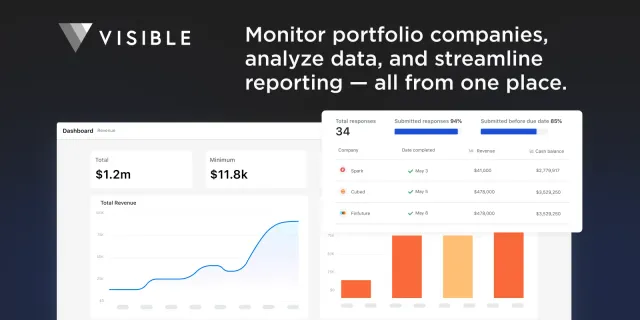
Visible: investor reporting and portfolio monitoring
Monitor portfolio companies, analyze data, and streamline reporting, all from one place.
Meta Product Manager Interview
A full mock PM loop: product sense, execution, and how the interviewers grade both.
Retrieval
Search runs on meaning, not keywords. Type what you half remember. The query below shares almost no words with the title it finds, and it still comes back first, with the sentence that matched.
semantic + full-text, across titles, content,
highlights, and transcripts
 David Fravor: UFOs, Aliens, Fighter Jets, and Aerospace Engineering | Lex Fridman Podcast #1226 Augyoutube.comContext: …a white tic-tac shaped object, no wings, no rotors, moving in ways nothing we had could match…Meta Product Manager Interview21 Junyoutube.comBut what is a neural network?22 Julyoutube.com
Capture
The extension lives where you read. One shortcut saves the page; the AI does the filing while the dialog is still open.
Quality matters more than quantity. If you read one book a month but fully appreciate and absorb it, you’ll be better off than someone who skims half the library without paying attention. Getting the rough gist and absorbing the lessons are two different things. Confuse them at your peril.
 fs.blog · How to Remember What You Readtry the swatches
David Fravor: UFOs, Aliens, Fighter Jets, and Aerospace Engineering | Lex Fridman Podcast #122
1:11:04 / 3:56:24TL;DR Cmdr. David Fravor on the 2004 Nimitz encounter: a white tic-tac shaped object that outmaneuvered two F/A-18s, plus carrier flying, jet design, and staying skeptical.
chapters pulled from the video
The backlog
Import from Pocket, Raindrop, or plain browser bookmarks. The AI Organizer reads the whole pile, proposes a board structure, and files everything after you approve it. Every import is auto-tagged on the way in, so the backlog becomes searchable immediately.
Pocket exports · Raindrop collections · bookmarks.html
AI Organizer
Proposal ready · nothing moves until you approve
 Machine learningPapersTooling214
 Product & pricingSaaS teardowns96
 Cooking89
 DesignType & colorTokens175
 Long reads168
AI chats
That one ChatGPT conversation that finally explained it? Save it. Marqly captures chats from ChatGPT, Claude, and Gemini into their own workspace, kept and searched like everything else you save.
ChatGPT14 turns · saved 5 Augpgvector or Pinecone for ~200k embeddings on a hobby budget?
pgvector, comfortably. At 200k rows with HNSW you'll see single-digit-millisecond queries, it lives inside the Postgres you already run, and the bill is the database you were paying for anyway. Pinecone earns its keep past ~5M vectors or when…
searchable next to every article you saved about embeddingsChatGPTpgvector vs Pinecone for a weekend project
Costs, latency, and when a managed vector DB is overkill. Verdict: pgvector until you pass ~5M embeddings.
ClaudePlan a zero-downtime Postgres 15 → 17 migration
Logical replication, dual-write window, and the rollback tripwires to set before cutover.
 Gemini
Two weeks in Japan with a 4-year-old
Slower itinerary, konbini strategy, and which shinkansen cars have the stroller space.
Everywhere
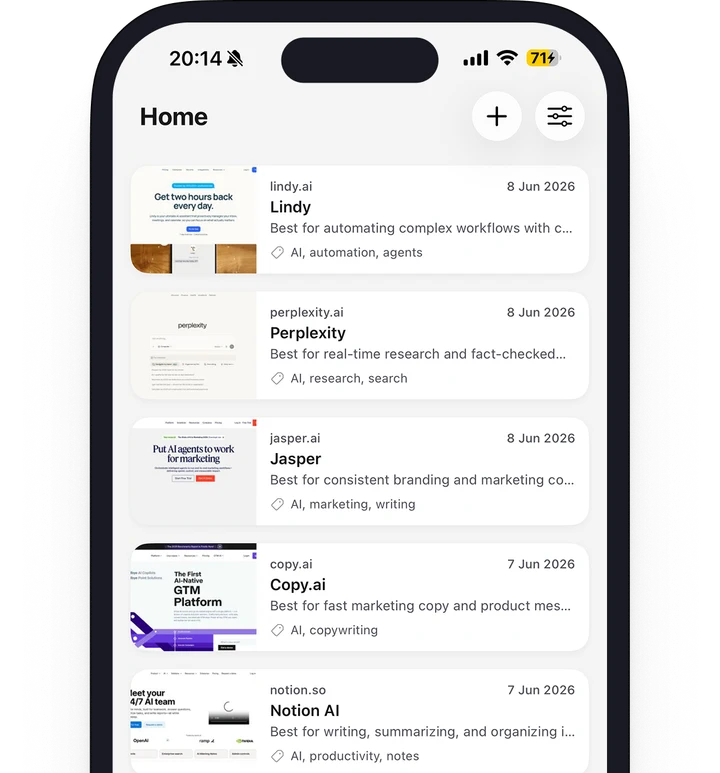
One library, synced. The extension in your browser, the web app anywhere, iOS and Android apps in your pocket, and a new tab page that starts your day inside it.

Good morning
Friday, August 8 · 9:41


 +4
+4Photo · Unsplash
And the rest of the browser
Clipboard
Search copiesQuality matters more than quantity. If you read one book a month…
pinned4242 4242 4242 4242 · test card
2m#17C964
1hnpm i sharp --save-dev
3hSaved sessions
Save & close tabs · Alt+TRestore allRestore allPricing
$0
forever · no card required
$72$49/first year
then $72/year · just $4.08/month for year one
$72/seat/yr
about $6/seat/month, billed yearly
3-seat minimum — from $216/year
Reviews
“Great bookmarking tool with a user-friendly interface. Absolutely a great way to save your bookmarks.”
“I've tried several bookmark managers over the years, and Marqly stands out because of its clean interface and powerful organization features.”
“Wow, very useful [bookmark app].”
“Saving bookmarks is fast, and the organization features make it easy to manage a growing collection of links. It's reliable and straightforward to use.”
“It makes organizing bookmarks incredibly simple and keeps everything neatly categorized. The interface is modern, responsive, and easy to use.”
“Fantastic way to organize bookmarks. Highly recommended!”
“I love the simplicity of Marqly. It allows me to manage all of my bookmarks in a single place.”
“The search, boards, and tagging features make finding saved content effortless. It's simple to use yet packed with useful functionality.”
“Great [bookmark app], highly recommended.”
“Marqly is a well-designed bookmark manager that makes organizing and retrieving saved resources incredibly efficient.”
“I've been thoroughly impressed with Marqly's functionality and overall user experience. … The attention to detail in both design and usability is evident.”
“Marqly offers everything I need in a bookmark manager. … I highly recommend it to anyone looking for a smarter way to organize their web content.”
“The reader mode plus AI summaries save me hours every week. Worth every cent of Pro.”
“An excellent tool for professionals, researchers, and teams who manage a large number of online resources.”
“Wow, Marqly is the best [bookmark app] to use. Highly recommended.”
“What impressed me most is how simple everything is. I didn't need any tutorial to get started.”
“Creating collections, organizing links, and retrieving saved content is effortless. It has become an essential part of my workflow.”
“Excellent bookmark manager with a modern design and useful features. … Everything syncs smoothly, making it easy to access my saved content across devices.”
FAQ
Free plan. Two clicks. No card.